Business management system · English / 中文

Run your whole business from one place.

Inventory with QR scanning, cash-first bookkeeping, bank reconciliation, invoices, HR, leave, claims and payroll — in one system your whole team can use.

  • English & 中文
  • Works on any phone
  • Every change audited
portal.operra.my
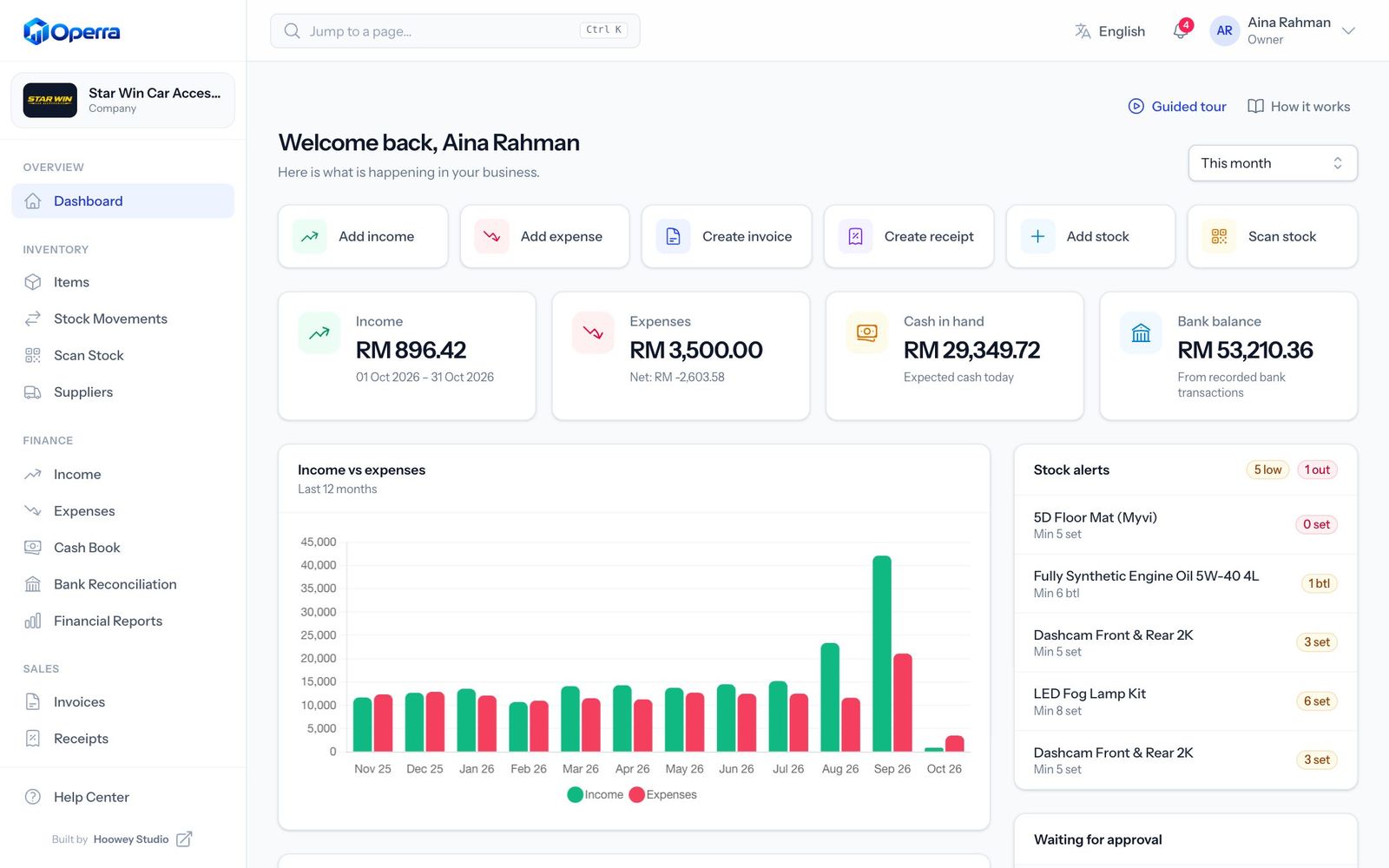
Operra dashboard showing income, expenses, cash in hand, bank balance and stock alerts
Low stockLED Fog Lamp Kit · 6 / 8
Cash balancedExpected = counted · RM 2,215.30
Bank statement matched✓ 138 · ? 3 · ✕ 6
  • Inventory
  • QR & barcode
  • Cash book
  • Bank reconciliation
  • Invoices
  • Receipts
  • Employees
  • Leave & holidays
  • Claims
  • Payroll
  • Reports
  • Audit log

Why Operra

Most growing businesses run on a notebook, three spreadsheets and a WhatsApp group. Operra brings stock, cash, staff and payroll together — so closing time takes minutes, not hours.

Everything in one place

Built for the way your business actually runs.

Cash at the counter, transfers in the bank, stock on the shelf and people on the payroll. Operra keeps them in step.

Inventory

Stock you can scan, not guess.

Every item gets its own SKU, QR code and barcode. Print labels, scan with any phone, and get alerts before you run out.

  • Stock in, out, count and transfer between locations
  • Full history: before, after, who and when
  • Low-stock alerts by email, WhatsApp or SMS
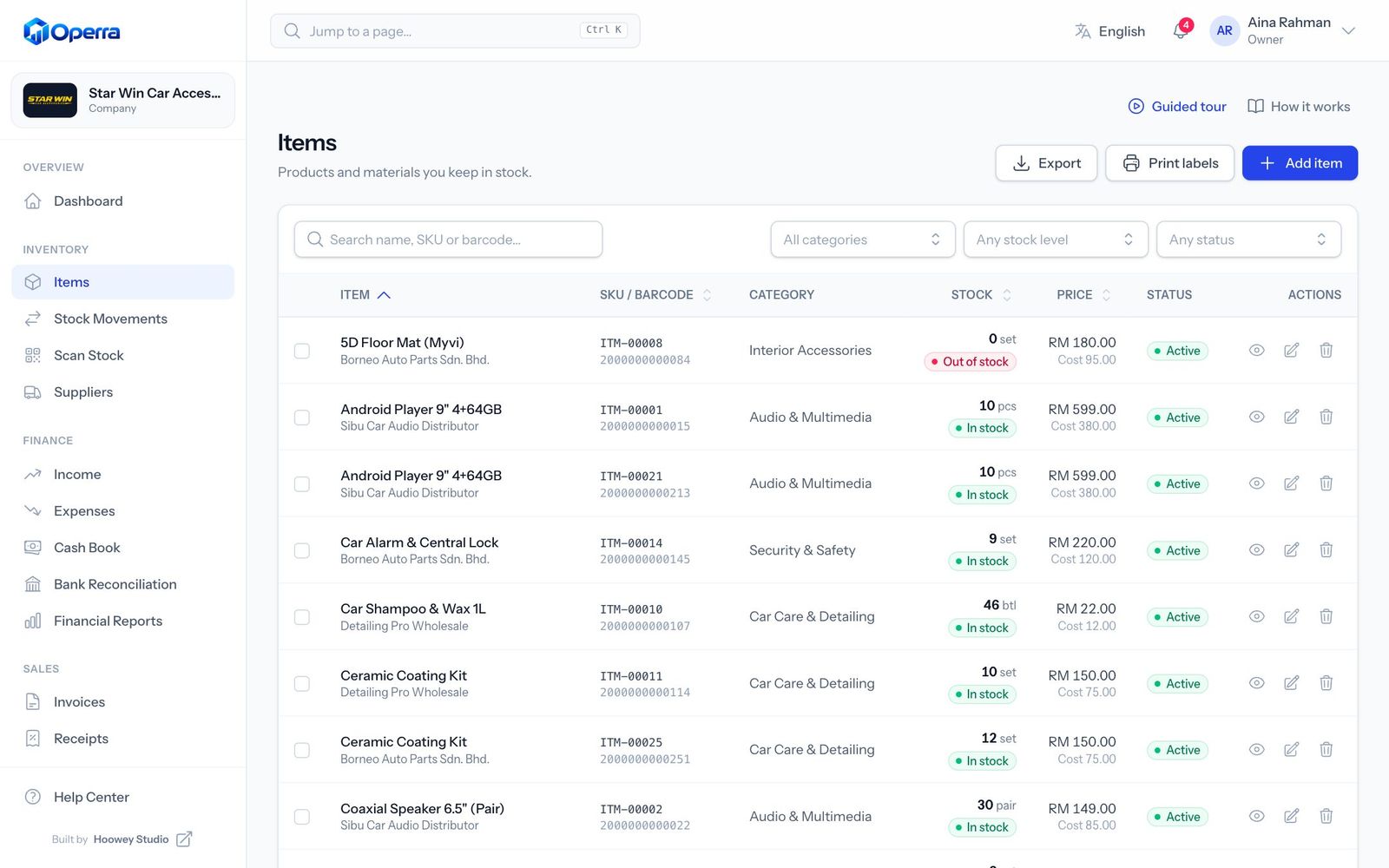
portal.operra.my
Inventory list with stock levels and low-stock badges

Cash-first bookkeeping

Record income and expenses with receipts attached. The cash book shows what should be in the drawer, so every shortfall is caught the same day.

Bank reconciliation

Upload a PDF, CSV or Excel statement. Operra matches each line to your records and shows what is missing.

Invoices & receipts

Professional PDF invoices with your logo, discounts and tax. Record partial payments, issue receipts, and income is posted automatically.

HR, leave & claims

Employee profiles, leave balances that skip weekends and holidays, and claims that go from submitted to paid with one click.

Payroll with EPF & SOCSO

Monthly runs with allowances, claims, bonus and statutory deductions. See the real cost of each employee and print signed payslips.

How it works

From shelf to system in four taps.

  1. 01

    Scan the label

    Open Scan Stock on any phone and point the camera at the QR code or barcode. USB scanners work too.

  2. 02

    Item detected

    Operra finds the item instantly and shows what is on the shelf right now.

  3. 03

    Enter the quantity

    Choose stock in, out, count or transfer, then type how many.

  4. 04

    Stock updated

    The balance changes immediately and the movement is saved with who did it and when.

Cash book

Know exactly how much cash should be in the drawer.

Operra works out the expected closing cash from every sale, expense and bank deposit. Count the drawer, enter the amount, and any difference is flagged straight away.

  • Cash, bank transfer, DuitNow QR, card and e-wallet
  • Receipts and documents attached to every entry
  • Daily, monthly and yearly profit & loss

Today’s cash 15 Nov 2026

Opening cash RM 1,200.00
+ Cash sales RM 4,860.50
+ Other cash income RM 300.00
− Cash expenses RM 1,145.20
− Moved to bank RM 3,000.00
Expected closing cash RM 2,215.30
Counted in drawer · RM 2,215.30 Balanced

Bank reconciliation

Upload the statement. Operra finds what is missing.

Drop in your bank statement and every line is compared with your bookkeeping. Confirm possible matches with one click, or create the missing income or expense on the spot.

PDFCSVExcel
portal.operra.my
Bank reconciliation screen with matched, possible and unmatched lines

Reconciliation summary

✓ Matched 138 RM 32,450
? Possible match 3 RM 1,326
✕ Unmatched bank 6 RM 1,820
✕ Unmatched system 3 RM 950

Modules

Fourteen modules. One login.

Turn on what you need today and grow into the rest. These are real screens from Operra.

portal.operra.my
Dashboard
01

Dashboard

Income, expenses, cash and bank at a glance, with quick actions.

portal.operra.my
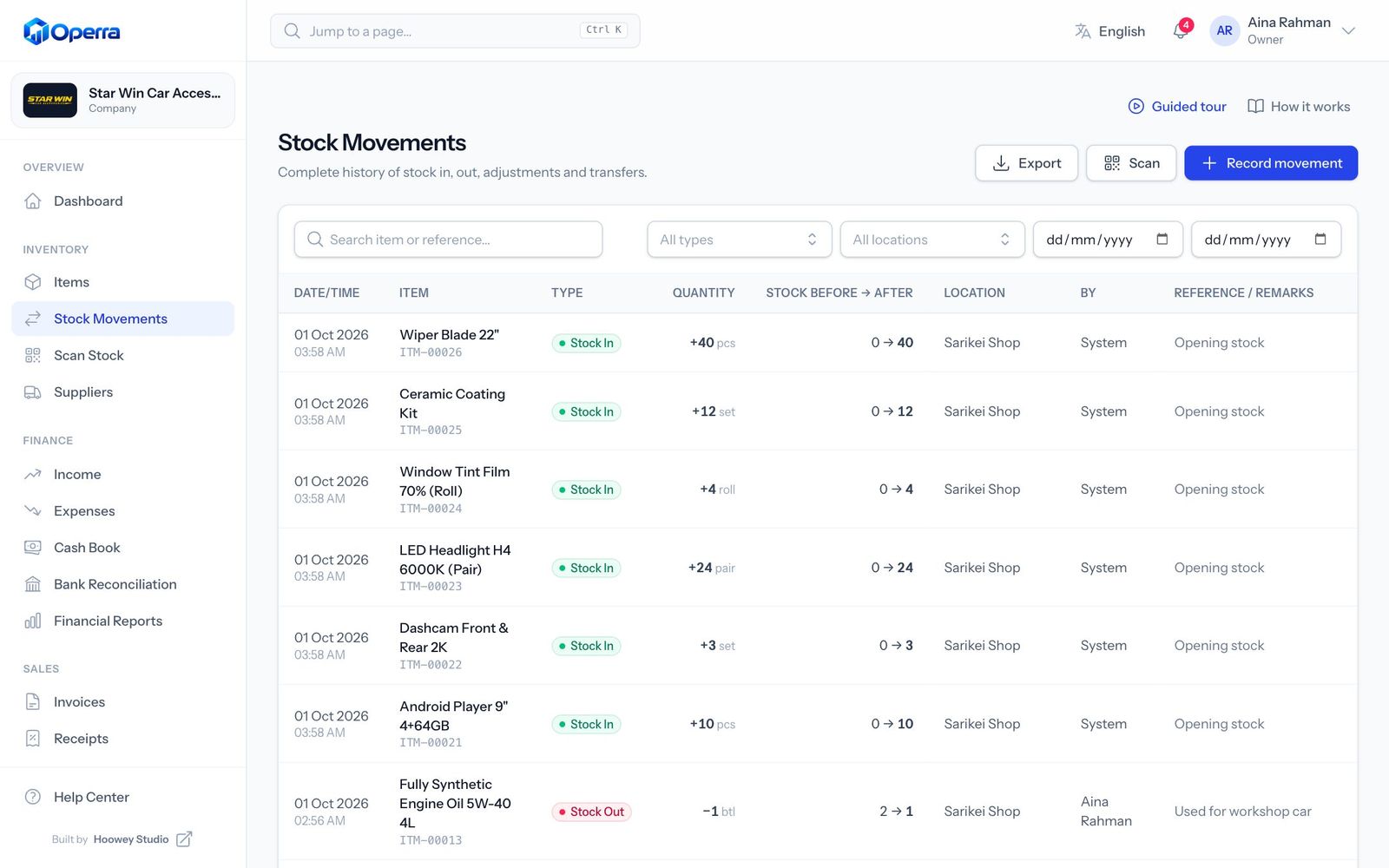
Stock history
02

Stock history

Every movement with before, after and who made it.

portal.operra.my
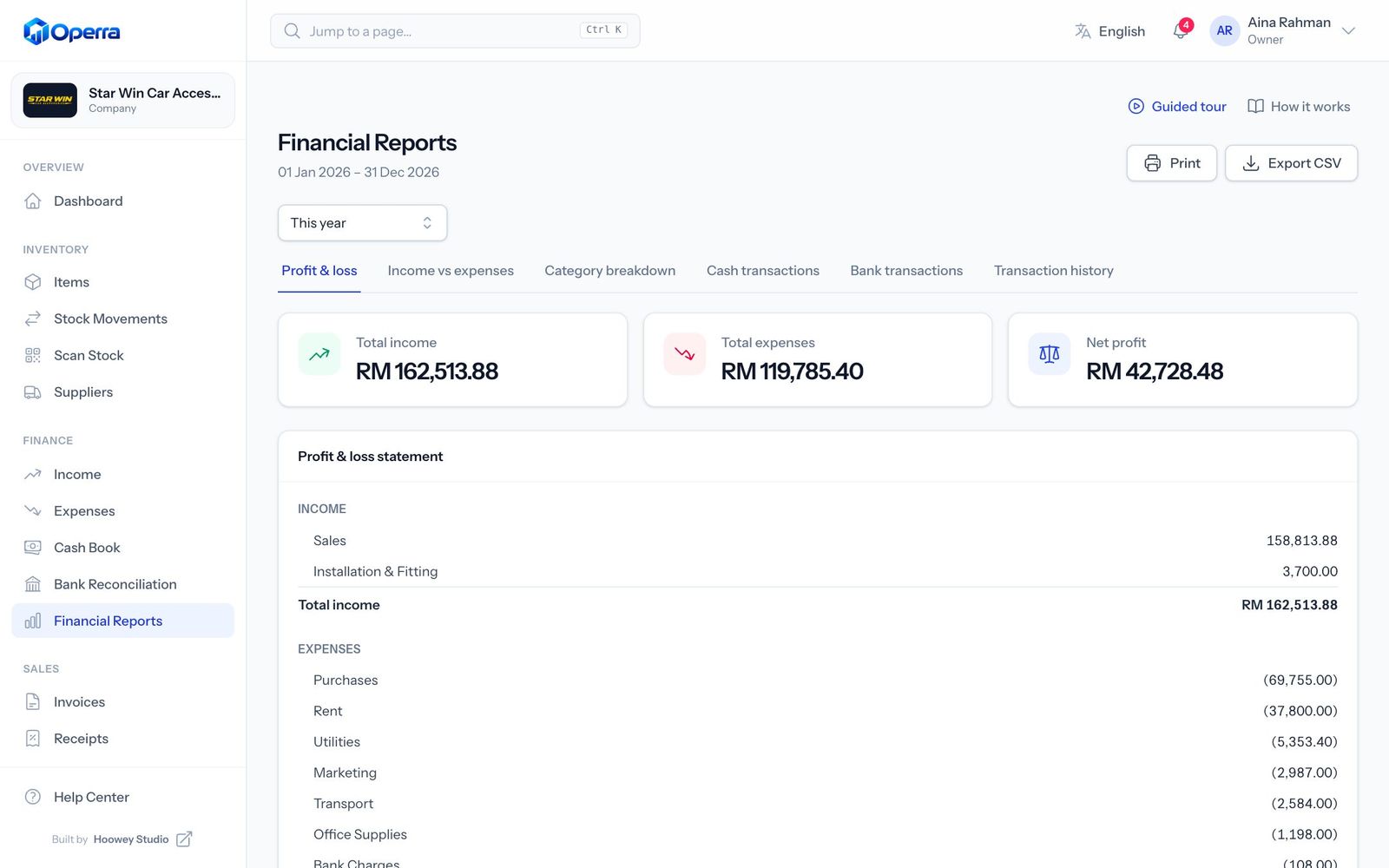
Financial reports
03

Financial reports

Profit & loss, trends and category breakdowns. Export to CSV.

portal.operra.my
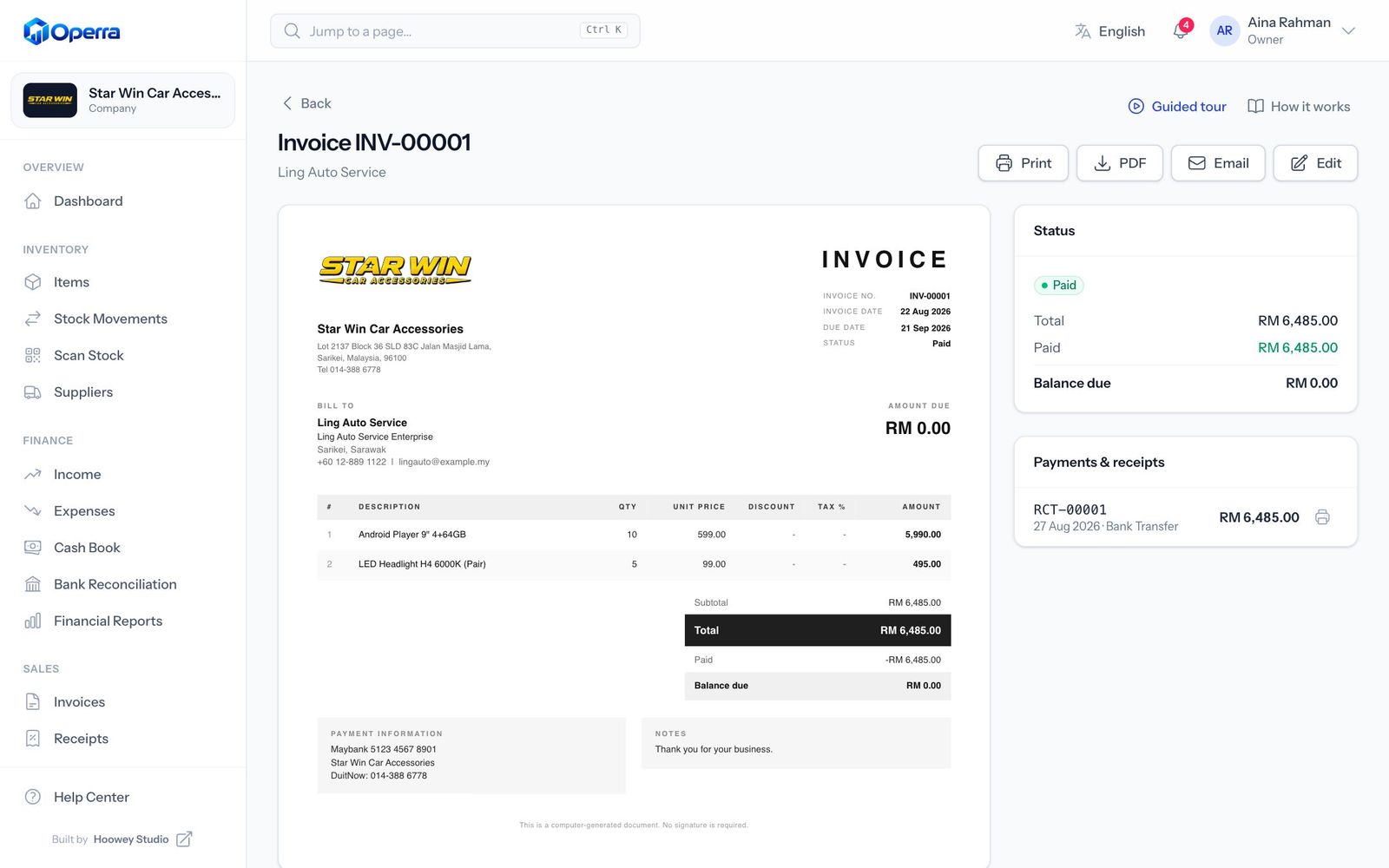
Invoices
04

Invoices

Track payments and send PDF invoices in seconds.

portal.operra.my
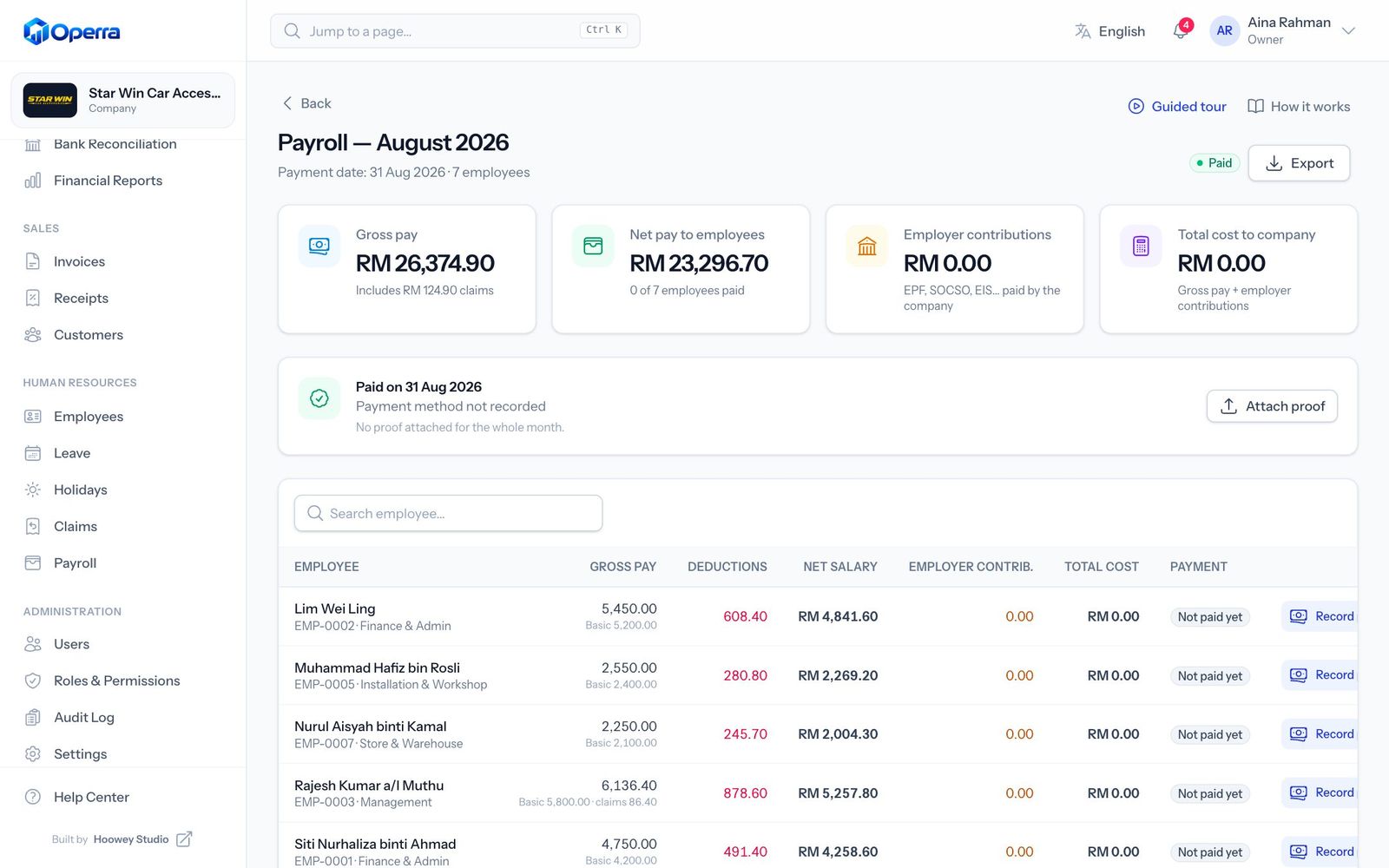
Payroll
05

Payroll

Monthly runs with EPF and SOCSO worked out for you.

portal.operra.my
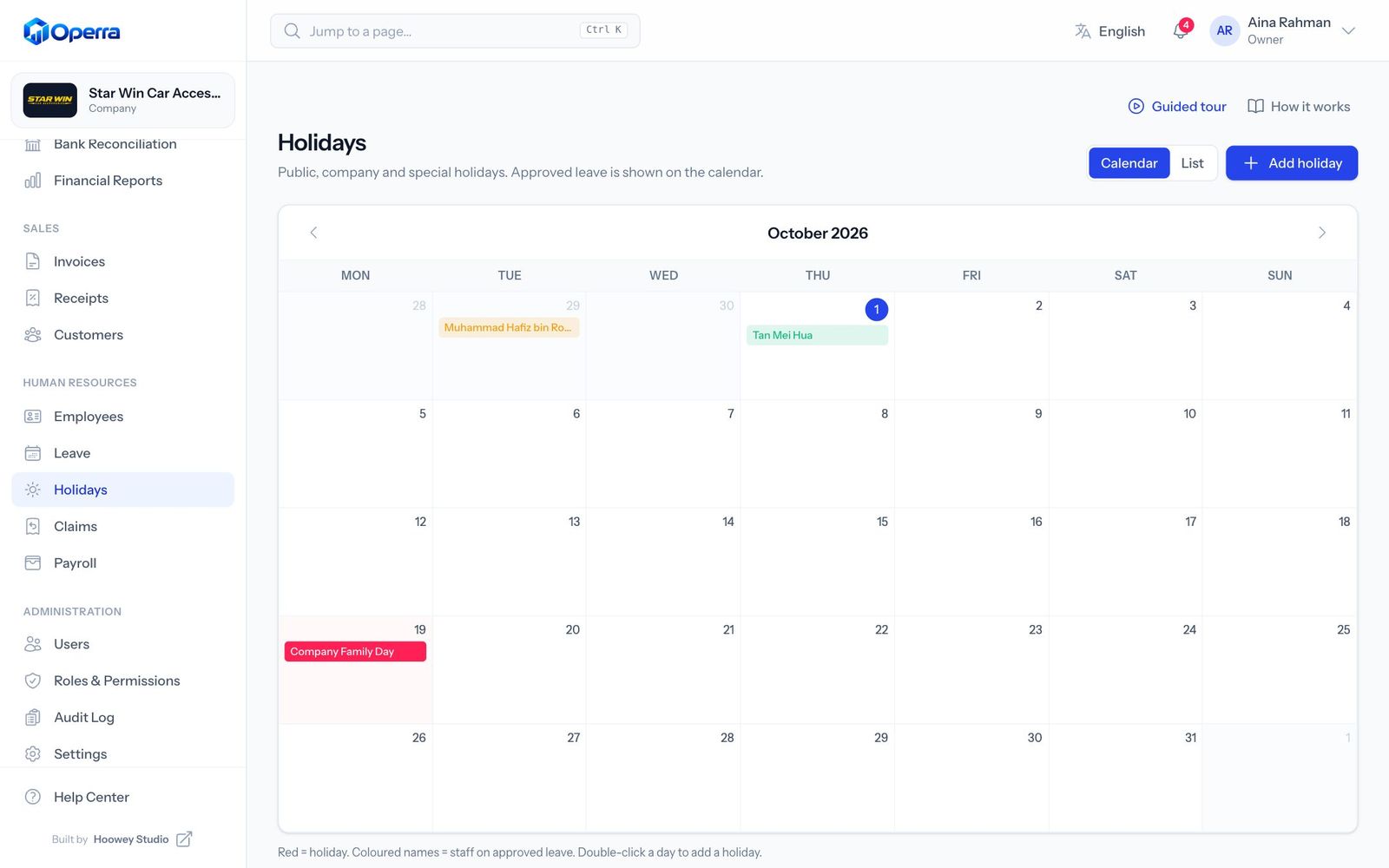
Holidays & leave calendar
06

Holidays & leave calendar

Public holidays and approved leave on one calendar.

portal.operra.my
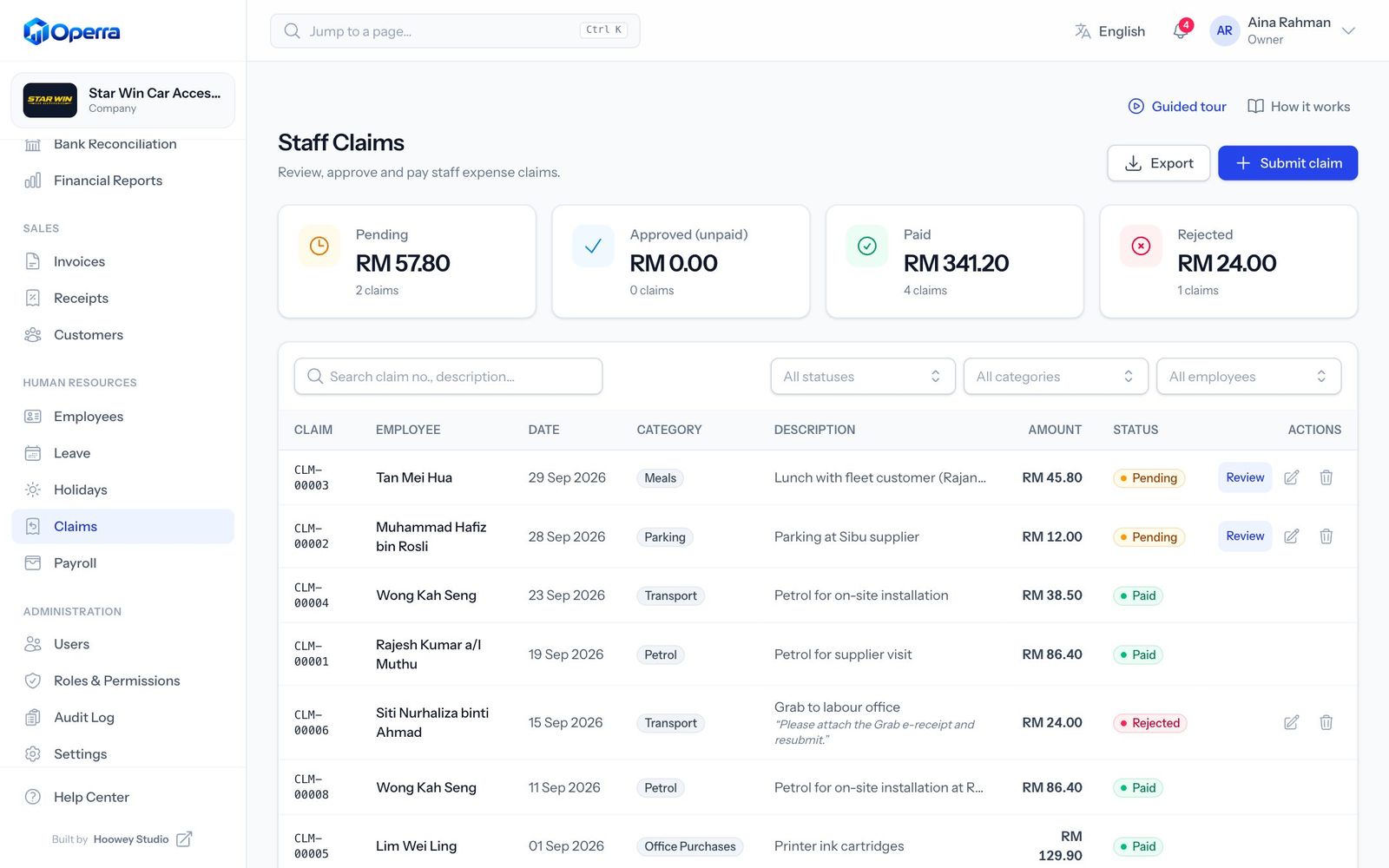
Claims
07

Claims

Submit, approve and pay staff claims with receipts.

portal.operra.my
Roles & permissions
08

Roles & permissions

Decide who can view, create, edit, delete, approve or export.

HR & payroll

Your team, paid right, every month.

Employee profiles

IC, bank details, salary items, documents and emergency contacts.

Leave that counts itself

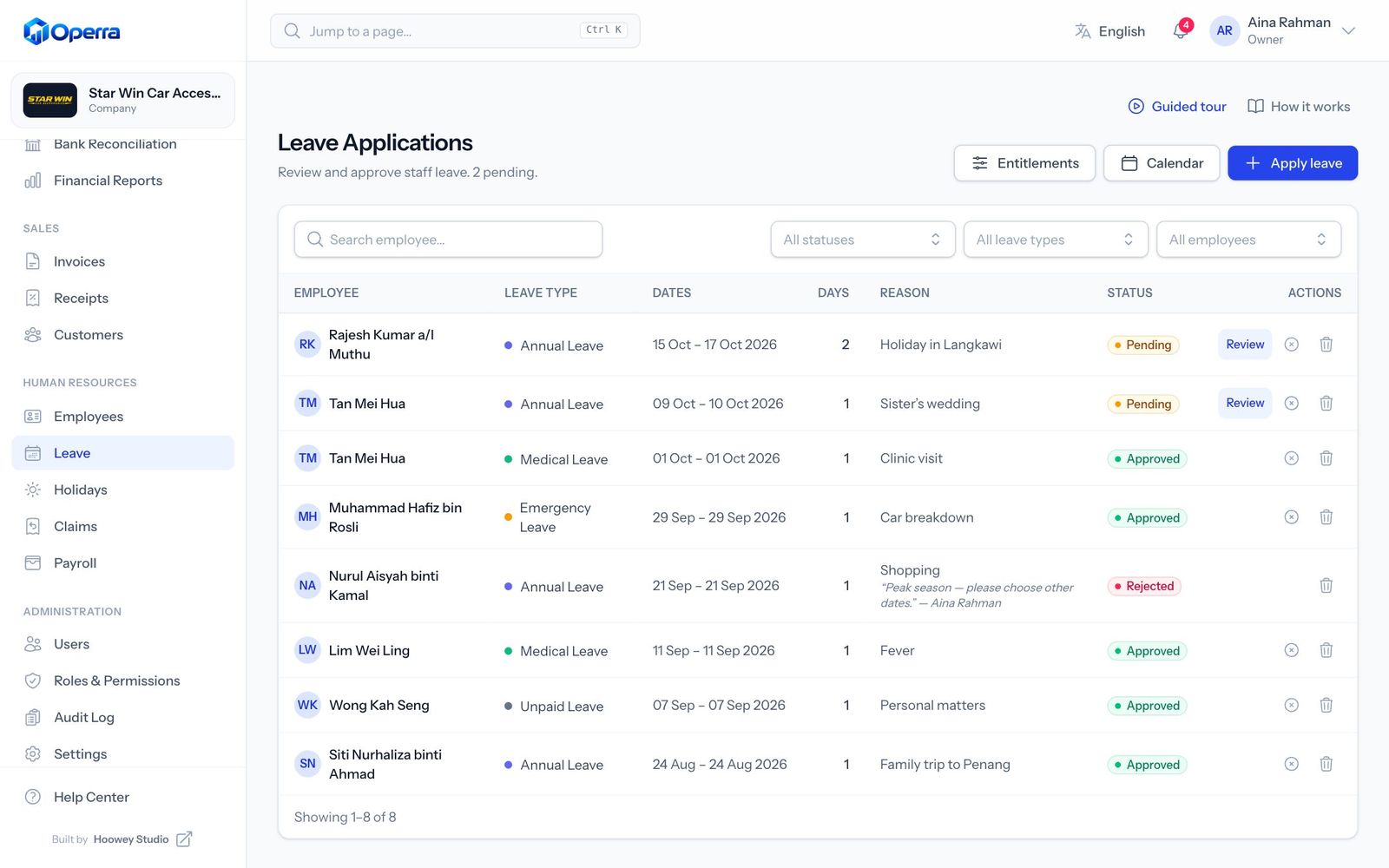
Entitlements, balances and approvals. Weekends and holidays are skipped.

Claims with receipts

Submit → Pending → Approved → Paid, then straight into payroll.

Payslips ready to sign

PDF payslips with employee and employer signature lines.

Bilingual

English and 中文, side by side.

Every menu, button, message and PDF is translated. Each person picks their own language, and each company sets its default.

portal.operra.my
Item page in English
The same item page in Chinese
EN中文

Control & trust

Everyone sees what they need. Every change is on record.

Roles & permissions

HR can manage leave without seeing your bookkeeping. Staff only see their own payslips and claims.

View Create Edit Delete Approve Export
Admin Allowed Allowed Allowed Allowed Allowed Allowed
HR Allowed Allowed Allowed Not allowed Allowed Not allowed
Accountant Allowed Allowed Allowed Not allowed Not allowed Allowed
Staff Allowed Allowed Not allowed Not allowed Not allowed Not allowed

Audit log

Logins, stock changes, salaries, approvals and permissions — with before and after values, IP and device. Nobody can edit it.

  1. Admin changed LED Fog Lamp Kit stock from 20 → 15
  2. HR approved 2 days annual leave for Aina
  3. Accountant marked September payroll as paid
  4. Owner gave the Manager role export access

Notifications

Low stock, leave and claims in the app, by email, WhatsApp or SMS.

Backups & export

Automatic daily backups. Export your data to CSV whenever you like.

No app to install

Runs in the browser on computers, tablets and phones.

Pricing

Simple plans that grow with you.

Prices in Ringgit for your whole company, not per user. Pay monthly, or pay yearly and save.

Starter

Stock, books and invoices for a small shop.

RM 39/ month

RM 990/ year

or RM 990 a year

Works out to RM 82.50 a month, billed yearly

Get Starter
  • 3 user logins
  • 1 stock location
  • 1,000 items
  • Inventory & stock
  • Bookkeeping
  • Invoices & receipts
  • Bank reconciliation (not included)
  • HR, leave & claims (not included)
  • Payroll (not included)
  • Inventory with QR codes and barcodes
  • Scan stock with your phone
  • Income, expenses and cash book
  • Invoices and receipts
  • Financial reports
  • Email support

Pro

For multi-branch businesses with a larger team.

RM 129/ month

RM 4,990/ year

or RM 4,990 a year

Works out to RM 415.83 a month, billed yearly

Get Pro
  • 25 user logins
  • 75 employees on payroll
  • Unlimited stock locations
  • Unlimited items
  • Inventory & stock
  • Bookkeeping
  • Invoices & receipts
  • Bank reconciliation
  • HR, leave & claims
  • Payroll
  • Everything in Business
  • Unlimited stock locations and items
  • Priority support
  • Onboarding call

Secure payment by Stripe. Need more users or a custom setup? Talk to us

FAQ

Questions, answered.

Something else on your mind? Ask us during your demo.

Do we need to install anything?

No. Operra runs in the browser on any computer, tablet or phone. The stock scanner uses your phone camera, and USB or Bluetooth barcode scanners work too.

Is it suitable for a business that mostly takes cash?

Yes — that is what it was designed for. The cash book tracks expected cash against what you count, while bank transfers, DuitNow QR, cards and e-wallets are recorded alongside.

Which bank statements can we upload?

Any bank that lets you download a PDF, CSV or Excel statement. Operra reads the date, description, debit, credit and reference, then matches each line for you.

Does payroll handle EPF and SOCSO?

Yes. Employee and employer rates are worked out for every payslip, and you can adjust the rules in Settings. You also see the real monthly cost of each employee.

Can staff use it in Chinese?

Yes. Each person can switch between English and 中文 at any time, and the company can set a default language. What you type, such as item names, stays exactly as entered.

Can we limit what each person sees?

Yes. Built-in roles cover Owner, Admin, HR, Accountant, Manager and Staff, and you can create your own with view, create, edit, delete, approve and export rights per module.

Is our data safe?

Each company’s data is kept separate, every important change is written to an audit log that cannot be edited, and the database is backed up daily. You can export your data at any time.

Book a demo

See Operra with your own numbers.

A guided walkthrough in English or 中文. We can set up a trial company for you and help bring in your items, staff and opening balances.

  • A trial company set up for you
  • Help moving from spreadsheets
  • Training for your team

We only use your details to arrange the demo.

Secure checkout

Subscribe to Operra

Billing cycle
Total today RM 39

You pay on Stripe’s secure page. We then set up your company and email your sign-in link within one working day.

By continuing you agree to our Terms & Conditions and Refund Policy. Change your mind? Ask for a full refund within 7 days of payment.